Always know who's doing what
Octopussian is the collaborative calendar where you assign teammates directly to events. No invitations, no confirmations, no meeting for every slot.
Sharing individual calendars never shows who's really handling what. Octopussian does.
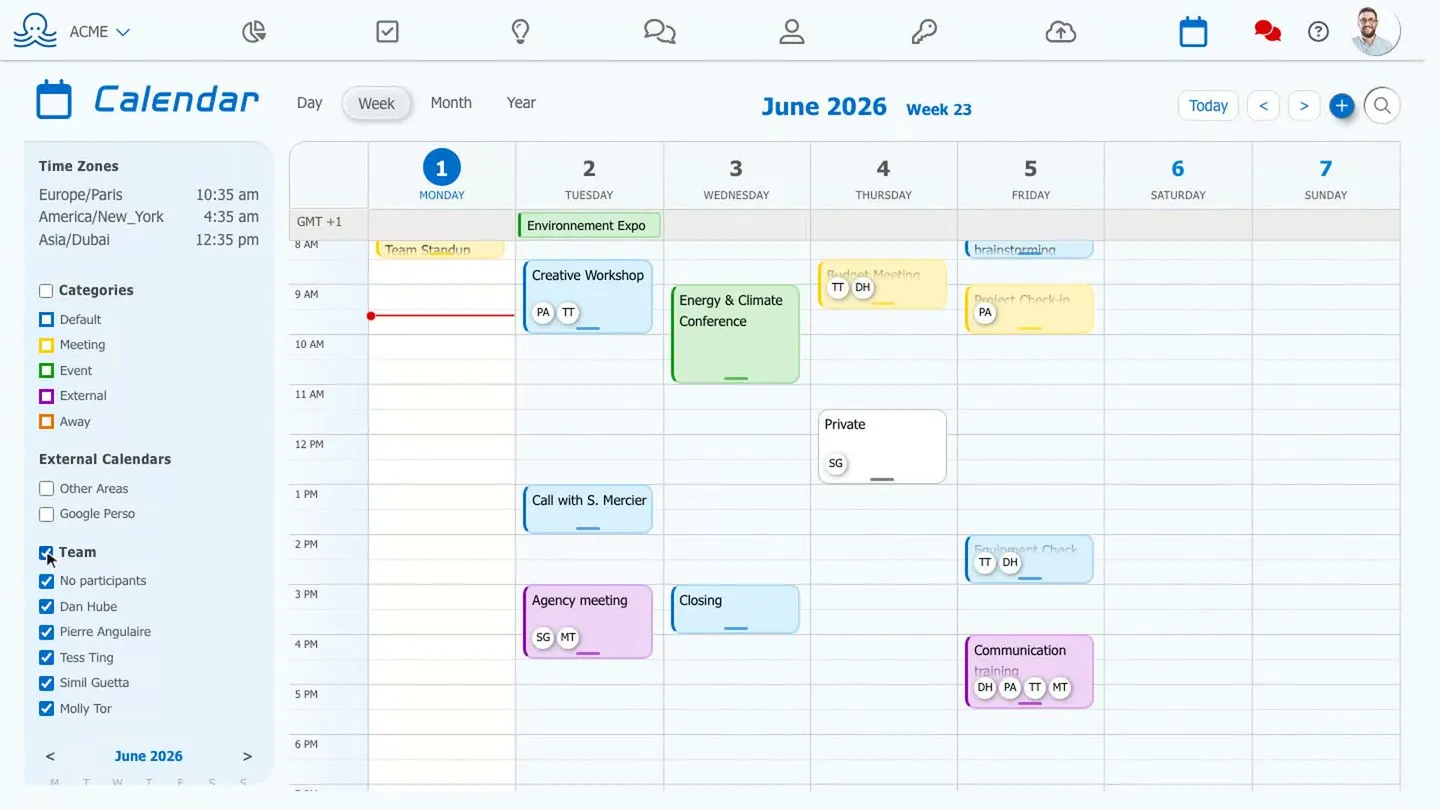
Assign a team member to a time slot
-
An event carries its participantsFor one teammate, the whole team, or no one. No invite to confirm.
-
Multiple clients, zero overlapA separate space per client, stackable whenever you want.
-
Video, tasks, and files includedEverything in one place, one subscription.

Sharing calendars isn't enough to coordinate a team
Everyone manages their own calendar and shares it - what you get is a patchwork of schedules, not a team view.
To find out who's handling what, you have to turn every task into a meeting, send out multiple invites, and wait for confirmations.
Multiple clients? Either you juggle separate accounts, or you mix everything into one calendar - and risk exposing it all.
And the calendar lives apart from everything else: video conferencing here, tasks there, files somewhere else. Tools stitched together, never designed together.
A calendar built for the team, not the individual
Octopussian starts from a simple premise: an event carries the people involved. You see who’s doing what at a glance, and everyone is notified - no need to fake a meeting just to assign someone.
The benefit isn’t having more features - it’s finally having features that were designed to work together.
Collaborative by nature
Attendees appear directly on the event as avatars. Assigning a colleague to a time slot takes just a few clicks, and they’re notified automatically.
Multiple workspaces, perfectly isolated
Each client, project, or entity has its own space. You work in one space without seeing the others; when you choose, you can overlay all your spaces to avoid double-booking - without your clients ever seeing each other.
Everything in one place
The calendar talks to the rest of the suite: one-click video conferencing, dated tasks that surface in the calendar, attachments from the Drive. One tool, one subscription.
Your data in Europe
A French product, hosted in France on OVH. Privacy is managed event by event: a single “private” checkbox is all it takes for others to see only “busy” - no details.
How does it work?
Create your workspace
Invite your team, or create a workspace per client. Everyone accesses what's relevant to them.
Schedule an event
Enter the title, add participants with predictive search, and choose a category or recurrence.
The team is aligned
Everyone gets notified and immediately sees who's doing what. The video call, location, and directions are already set up.
What changes day-to-day
You schedule a meeting just to tell someone they need to handle something.
You assign it to the event. They're notified - no invite, no confirmation needed.
Two clients, two accounts. Or one calendar where everyone sees each other's appointments.
A separate space per client, overlaid so you never double-book.
The video link in one tool, the task in another, the file as an attachment.
The video call, the task, and the file all live on the event. One subscription.
Built for those who juggle
If your day mixes multiple clients, multiple projects, and a team, Octopussian's calendar brings you clarity.
Multi-client freelancers
Keep a separate space per client. A focused view to move forward, an overview to never let things overlap.
Agencies and studios
Assign time slots across team members and clients - everyone sees what's relevant to them.
Small teams and SMBs
Coordinate meetings, travel, and time off without stacking up tools.
Consultants
Track multiple engagements in parallel, in separate but overlapping spaces.
Everything a team calendar should be able to do
Natural language input
Describe your event in one sentence; the calendar pre-fills the title, date, recurrence, and attendees.
Type something like “Weekly project sync every Tuesday at 10am with Molly.”
The calendar suggests a structured event for you to review before saving.
AI proposes, you decide.

Manage your time zones
Display multiple time zones, with working hours highlighted.
Finding a slot across multiple time zones usually means a converter tab and a lot of guesswork.
With the risk of booking a client at 7am.
Add the time zones you use and see everyone’s working hours side by side. The best slot becomes obvious at a glance.

Day, week, month, and year views
From a one-hour slot to a full-year overview.
Color-coded categories and combinable filters
By category, by person, by workspace, or by calendar.
Predictive attendee search
A few letters is all it takes - they'll be notified.
Private events
Others see “busy,” with no details.
Recurrences
Your regular appointments, scheduled once.
Integrated video conferencing
An Octopussian video call straight from the event - no third-party tool needed.
External calendars as overlays
Google Calendar, iCloud, or ICS in read-only mode, while you migrate.
Tasks and attachments
A dated task, a file from the Drive - right from the event.
How much does it cost?
Annual billing: 2 months freeThe full collaborative calendar for your team and spaces, with slot search and booking links.
Choose this moduleThe calendar and all other Octopussian tools, all in one.
Get started for freeFrequently Asked Questions
What is a collaborative calendar?
It’s a calendar where events directly list their participants - everyone sees who’s doing what, without having to create a meeting just to assign a task. Unlike simple individual calendar sharing, it’s built for teams.
Can I manage multiple clients or projects separately?
Yes. Each client or project has its own isolated space. You work in one space at a time, and you can overlay your spaces to check availability - without your clients seeing each other.
Can I import my existing calendar?
Yes. You can display your Google Calendar, iCloud, or ICS calendars as read-only overlays, letting you migrate gradually, at your own pace.
Is my data hosted in France?
Yes. Octopussian is a French product, hosted in France on OVH.
Can events be kept confidential?
Each event can be marked as private: other members only see “busy,” with no details shown.
Is the calendar included in my subscription?
The calendar is available à la carte or as part of the all-in-one plan that brings together all Octopussian tools. Full details are on the pricing page.
A sovereign solution: French, hosted and operated in France
Learn more about security and sovereignty- French publisher - self-operated servers, no third party accesses your data
- Hosted and backed up in France, with OVHcloud
- Hosting and operations not subject to the Cloud Act
- European AI (Mistral): your content processed within the European Union
- Your data is never sold or used to train an AI

Get started today
Set up your workspace in one minute. No credit card, no commitment.
Boost your efficiency today. Sign up to try for free.
We use your email and name
to create your Octopussian workspace.
Google may set technical cookies for this login.
Creating your account…
We respect your privacy. Your information will not be used for any other purpose.
By signing up, you accept our terms of use and privacy policy
Hosted in France at OVH. Your data stays in Europe.
Thank you for your trust
You will receive an email containing a link to complete your registration.