Share your professional contacts in real time
A shared team directory and contact list, accessible to all your collaborators
Your vendors, clients, and partners deserve better than a sticky note or a forwarded email.
- Always up-to-date contact info for the whole team
- Call or email in one click
- Internal directory included
No credit card. Sign up in 1 minute
The invisible problem costing you time
Contact details don't flow well in small teams.
The accountant's number is on a colleague's phone. The supplier's email is buried somewhere in a mailbox. Everyone pieces together information on their own - usually in a rush.
The result: wasted time and outdated information.
One team member updates a contact, the others keep using the old version. Not to mention the risk when someone leaves the team with their address book.
Octopussian centralizes your business contacts.
A shared space where every update is instantly visible to everyone. No more asking, forwarding, or searching - the information is right there.

What you get every day
Always up-to-date contact information
When a team member updates a phone number or email address, everyone benefits instantly. You eliminate conflicting versions and outdated information scattered across personal address books.
A team directory accessible anywhere
Especially useful for remote work or teams spread across multiple locations. Every team member can instantly find their colleagues' contact details - no more digging through an org chart or sending a message to ask for a number.
Immediate actions from the contact card
Click a number to call, or an email address to write. QR codes let you dial a number directly from your mobile. You go from information to action without copying anything down.
Simple to use, from day one
Create a contact record
Name, phone numbers, email, address, notes.
It's shared automatically
All your team members have instant access.
Call or message in one click
Direct links to phone and email.
Two Complementary Spaces
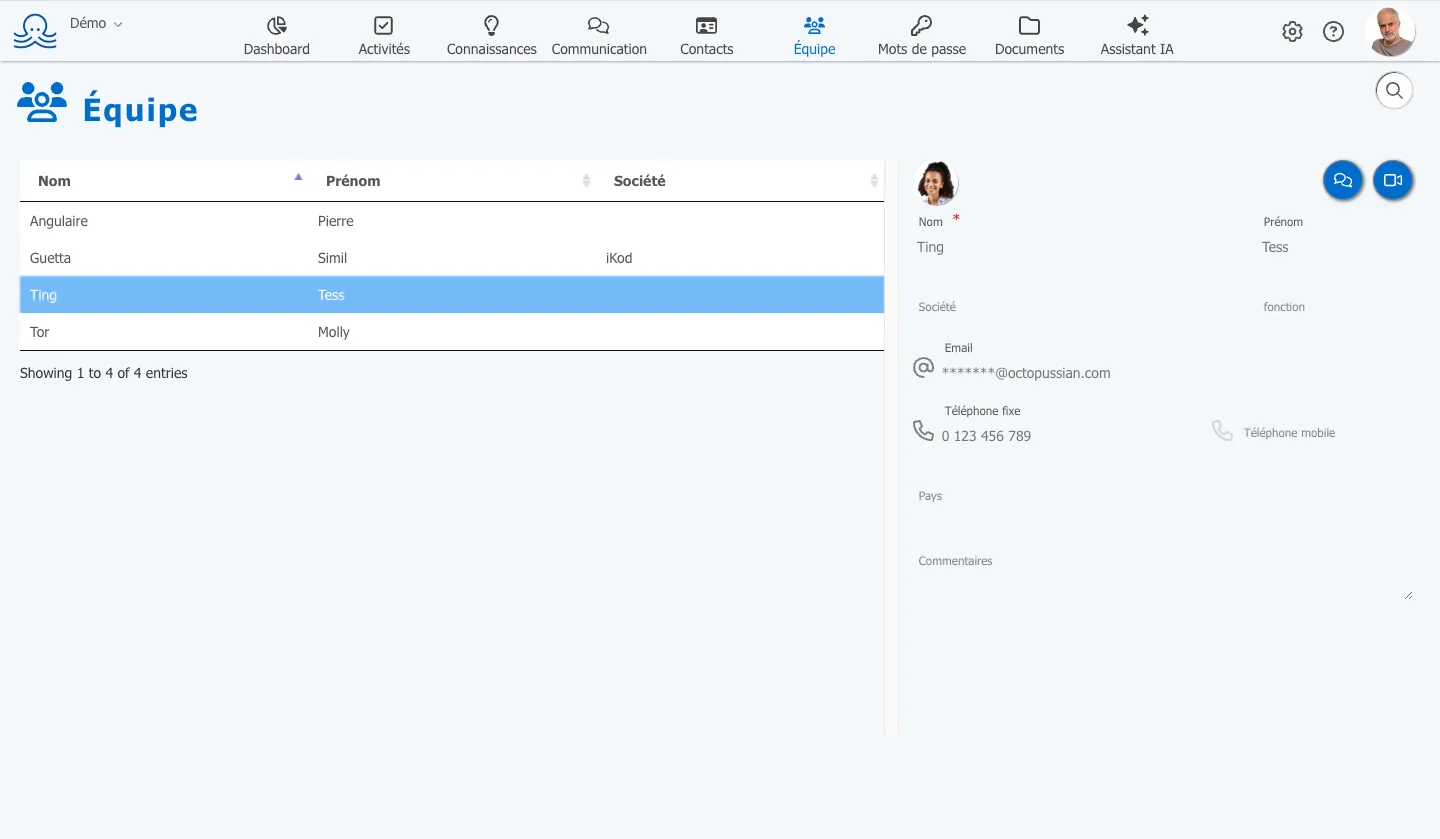
The People section brings together your internal directory and external contacts in a unified interface.
You get:
- A Team tab with contact details for all your collaborators (not editable by members)
- A Contacts tab for your vendors, clients, and partners (editable by the team)
- Instant search by first name, last name, or company
- Clickable links to call or send an email directly
- QR codes to dial a number from your mobile
- Direct access to chat or video conferencing with your colleagues
Ready to use, no setup required. Your team members find the team directory from their very first login. Shared contacts are added as your needs grow.
How much does it cost?
| Plan | Price | Inclusions |
|---|---|---|
| Free | 0 € | Up to 100 contacts |
| Contacts | 1 € ex. tax/month | Unlimited contacts, team synchronization |
| Pro Plan | 12 € ex. tax/month ⭐ Recommended |
Contacts + 9 other tools: Electronic Signature, Video Conferencing, Drive, Calendar,…
View all pricing → |
| ✓ Annual billing: 2 months free | ||
No credit card. Sign up in 1 minute
Frequently Asked Questions
What is the difference between the Team tab and the Contacts tab?
The Team tab automatically displays the contact details of all members of your organization. These entries cannot be edited by users to prevent errors. The Contacts tab is a free-form space where you add your vendors, clients, or partners. Every team member can create and edit these entries.
How does contact search work?
Search happens in real time as you type in the search field. It covers first name, last name, and company. Results appear instantly - no need to confirm.
Can I call directly from a contact record?
Yes. Phone numbers are clickable and open your calling app. On desktop, this works with apps like Messages on Mac or Skype. You can also scan the QR code displayed next to the number to dial it from your mobile device.
Does this feature replace a CRM?
No, and that's not its purpose. It's a simple shared directory for centralizing your professional contacts' information. If you need to track sales opportunities, detailed interaction history, or sales pipelines, a dedicated CRM will be a better fit.
Who can edit shared contacts?
All team members can create, edit, and delete contacts in the Contacts tab. Entries in the Team tab are managed automatically and cannot be edited by users.
Is this GDPR compliant?
Yes. Your data is hosted in France with OVH, encrypted in transit and at rest. You retain full control over stored information: editing, deletion, and export. Octopussian provides the secure infrastructure - you remain in control of how you use it.
Boost your efficiency today. Sign up to try for free.
We use your email and name
to create your Octopussian workspace.
Google may set technical cookies for this login.
Creating your account…
We respect your privacy. Your information will not be used for any other purpose.
By signing up, you accept our terms of use and privacy policy
Thank you for your trust
You will receive an email containing a link to complete your registration.