Protect and share your credentials, effortlessly.
Secure team vault: store, share, and control your passwords with zero compromise.

-
End-to-end encryptionRSA and AES, from entry to storage.
-
Granular per-user sharingGrant access to the right people, guests included.
-
Access tracking and controlAccess log, history, and one-click revocation.
Access traceability: a security imperative
When passwords are shared via email, spreadsheets, or messaging apps, risk goes up and control disappears.
It's nearly impossible to know who has access to what - and properly revoking access when someone leaves becomes a real challenge.
With Octopussian Passwords, you centralize and secure your secrets: strong encryption, controlled sharing, and a clear audit trail. Your private keys belong to you.
How do you manage access for employees who have left your organization? Do you know exactly who holds which password on your team?
The reality is concerning: more than 80% of internet users reuse their passwords across multiple sites, and 55% rely solely on memory to manage them. When a team member leaves, informally shared credentials become a blind spot in your security.
Without the right tools, there's no way to know which accounts former team members can still access - or to revoke their access effectively.
What you get
Secure sharing
Grant access to the right people - never the wrong ones. Guests and teams included.
Control and traceability
Track who sees what, when - and revoke access in one click. Access log and history included.
Overview
A clear view of accounts, owners, and delegations. You always know where the keys are.
How It Works
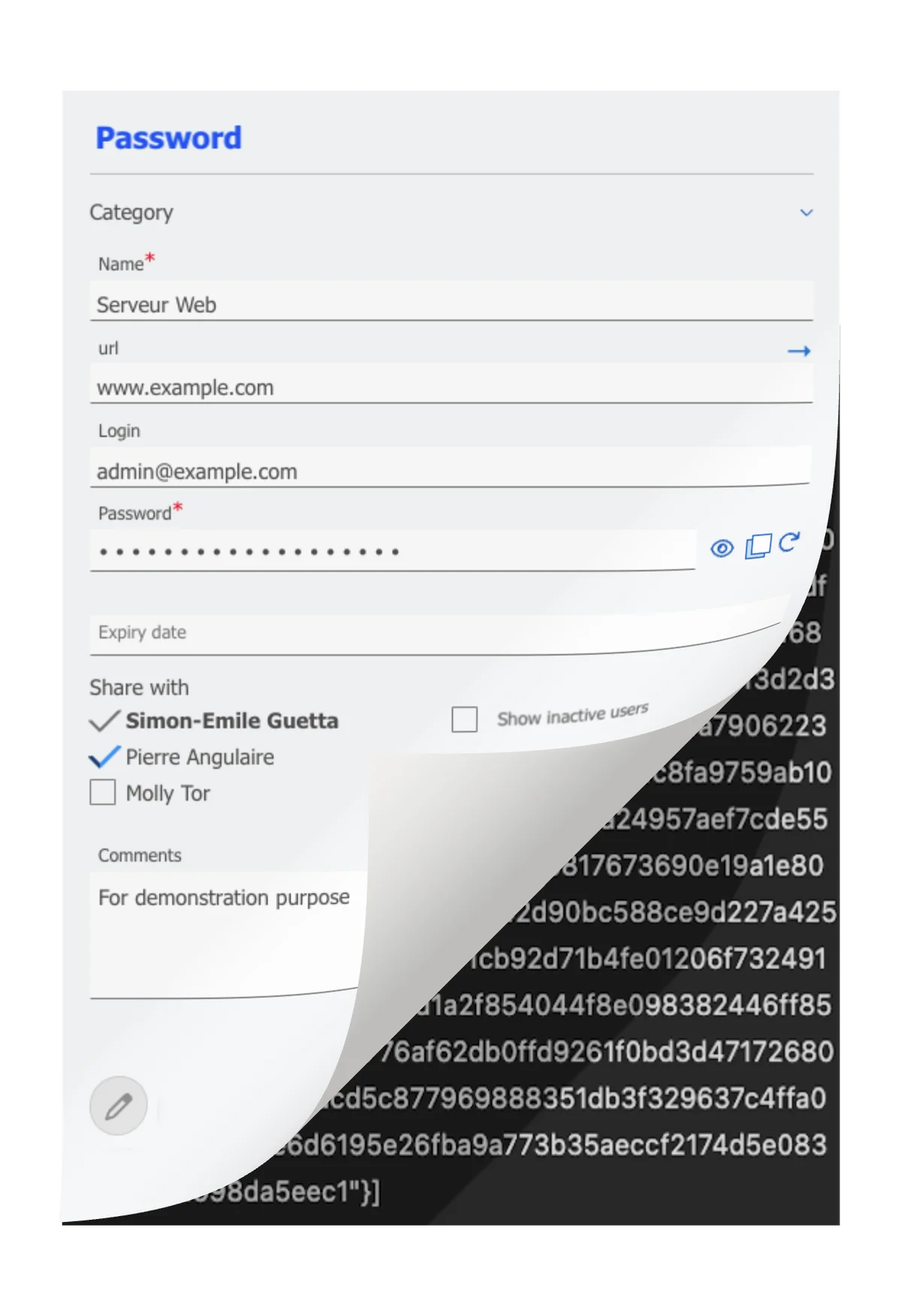
Store Securely
Centralize your passwords in an encrypted vault.
Organize them by category (servers, APIs, licenses) with a full change history.
Share Effortlessly
Grant access member by member within your team.
Share on demand with an external contractor via a secure, single-use link.
Control and Audit
See at a glance who has access to which password.
Identify outdated access rights and revoke them in one click.
Your keys belong to you
What's holding you back from adopting a password manager? The fear that a security breach could expose your sensitive data.
With Octopussian, we cannot read your passwords. Only you hold the private key capable of decrypting them. Even if our servers were compromised, your secrets remain unreadable.
- End-to-end encryption (RSA 2048 + AES)
- Hosting and backups in France (separate data centers)
- Strong authentication (TOTP, passkeys)
- Session duration control
Technical details
Your browser generates an RSA 2048-bit key pair. The private key stays on your device and is never transmitted. The public key is stored on our servers to enable sharing. Each password is encrypted with AES-256, and only your private key can decrypt it. This “zero-knowledge” model ensures that even Octopussian cannot access your data in plaintext.
Designed for teams that collaborate
Agencies and design firms
Manage client, server, and business tool access. Share a password with an external contractor on a one-off basis without creating an extra account. Automatically revoke access at the end of an engagement.
Technical and IT teams
Centralize API keys, server access, and sensitive credentials. Track who accessed which secret and when. Organize by project or environment (dev, staging, prod).
Small and growing businesses
Structure access management from day one. Streamline onboarding for new hires and secure offboarding for departures without losing control.
Tools that strengthen your security
Access summary table
See at a glance who knows which password. Instantly identify access credentials still held by former team members that haven't been rotated.
Anti-phishing Chrome extension
Secure autofill and built-in generator. If no password is saved for a site, a red banner appears showing the domain name in plain text and distinct colors to detect phishing attempts.
History and archiving
Keep previous versions of every password. Deleted passwords are archived, never lost. All changes are tracked with a timestamp and author.
Cryptographic generator
Create strong passwords directly in the interface or via the extension. Secure random generation powered by the browser's SubtleCrypto API.
One-time external sharing
Share a password with a contractor or partner via a single-use secure link. No account required for the recipient. The link self-destructs after viewing.
Technical details
The password is AES-encrypted server-side, but the decryption key stays in the URL fragment (after the #) and is never sent to the server. The recipient decrypts locally in their browser. Once viewed, the encrypted secret is immediately destroyed. If the link is intercepted and already used, you know the password may be compromised.
Categories and organization
Organize your passwords by type (servers, licenses, API keys, client accounts) to quickly find what you need.
How much does it cost?
Annual billing: 2 months free+ 9 other tools: Electronic signature, Video conferencing, Tasks, Drive,…
Start for freeFAQ
Who can read my passwords?
No one but you and the team members you share them with. Octopussian uses end-to-end encryption: only you hold the private key capable of decrypting your secrets. Even our technical team cannot access them.
What happens when a team member leaves?
Revoke their access in one click from the team settings. The access summary table immediately shows you which passwords they knew, so you can prioritize changing them.
How do I share a password with someone outside my team?
Use external sharing: generate a secure, single-use link and send it by email or messaging. Your contact doesn't need to create an account. The link is automatically destroyed after it's viewed.
Is my data hosted in France?
Yes. The database and its backups are hosted in France across two separate data centers, ensuring data sovereignty and European compliance.
Does the browser extension work on all websites?
The Chrome extension automatically fills in your credentials on most websites. If no password is saved for the site you're visiting, an alert banner appears to protect you against phishing.
Learn more
Passkey: The Password Alternative - Octopussian
A passkey replaces your password with a phishing-resistant cryptographic key. How it works, how to create one, and how to manage them day to day.
Read article →Passphrase: Long, Memorable Password - Octopussian
A passphrase is a sequence of randomly chosen words. How many words to aim for, why to avoid phrases that make sense, and when it's truly useful.
Read article →Phishing: How to Recognize and Avoid Attacks - Octopussian
Fraudulent emails, fake websites, fake URLs: learn how to spot a phishing attempt and what to do if you clicked.
Read article →Secure Password: Length Over Complexity - Octopussian
A long lowercase password beats a short one packed with symbols. Learn how long to go and how to create a secure password.
Read article →A sovereign solution: French, hosted and operated in France
Learn more about security and sovereignty- French publisher - self-operated servers, no third party accesses your data
- Hosted and backed up in France, with OVHcloud
- Hosting and operations not subject to the Cloud Act
- European AI (Mistral): your content processed within the European Union
- Your data is never sold or used to train an AI
Get started today
Set up your workspace in one minute. No credit card, no commitment.
Boost your efficiency today. Sign up to try for free.
We use your email and name
to create your Octopussian workspace.
Google may set technical cookies for this login.
Creating your account…
We respect your privacy. Your information will not be used for any other purpose.
By signing up, you accept our terms of use and privacy policy
Hosted in France at OVH. Your data stays in Europe.
Thank you for your trust
You will receive an email containing a link to complete your registration.