Communicate with your team without leaving your workspace
Integrated chat and video conferencing for small teams. No app to install, no extra account to create
How many tools do you use to communicate with your colleagues and clients?
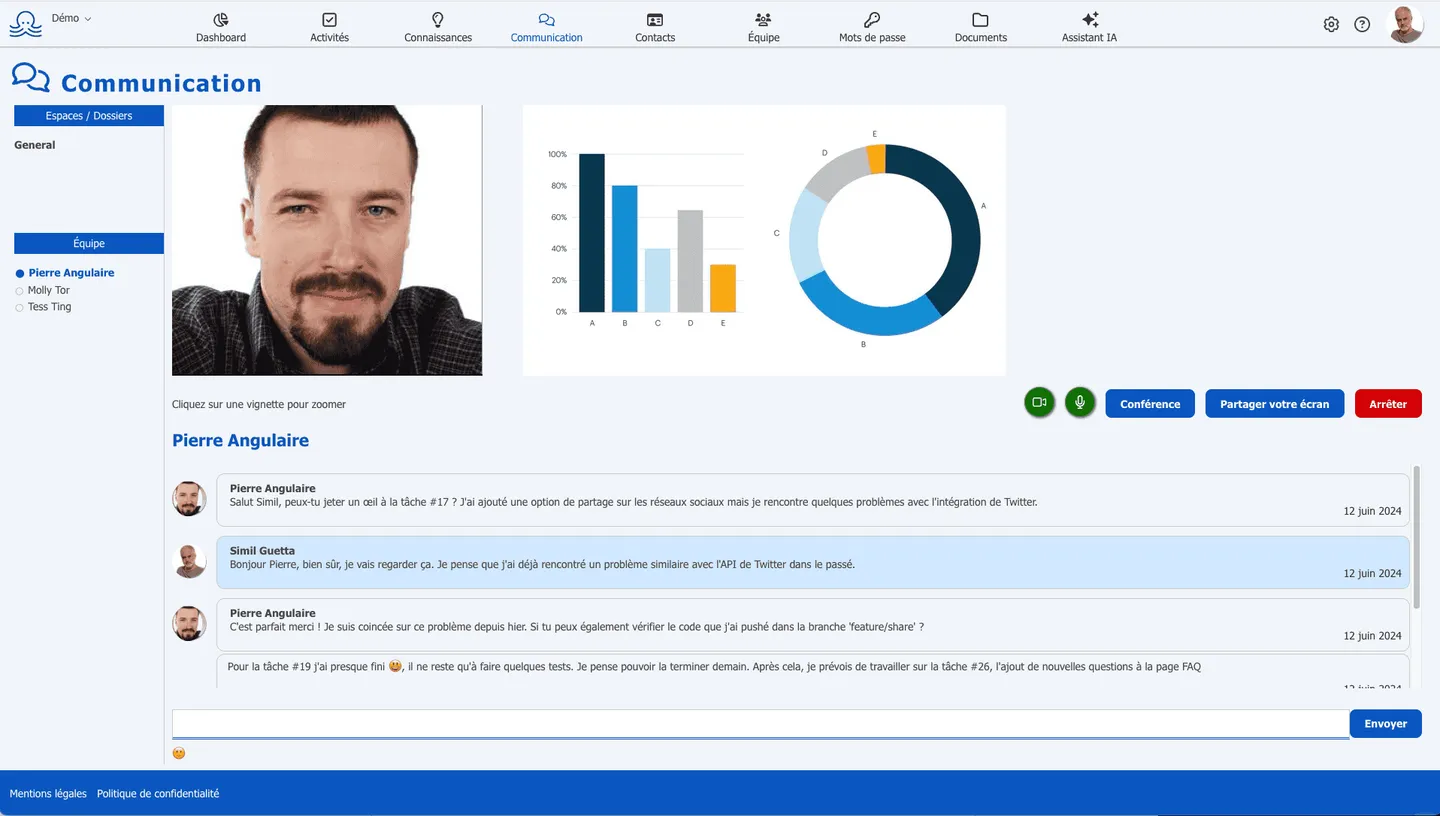
-
Launch a meeting in one click from your browser
-
Find your conversations in the same place as your projects
-
Invite external participants with a simple link
Scattered tools, conversations that slip through the cracks
Professional conversations are fragmented.
Between emails, instant messaging, video calls, and document comments, tracking down information becomes an exercise in patience.
Every meeting requires technical preparation.
Creating a link, making sure everyone has the right tool installed, troubleshooting connection issues… The time lost adds up.
Octopussian integrates chat and video conferencing into your workspace.
Your conversations are tied to your projects. One click takes you from text to video - no app switching required.
What you get every day
Contextualized conversations
Every project has its own dedicated discussion space. Conversations stay tied to their context - no more digging through generic message threads to track down a decision. History is retained for 30 days, and you can pin important messages to keep them accessible indefinitely.
Friction-free meetings
Your team is already in Octopussian? Meeting rooms exist by default for every workspace. Click on a colleague for a one-on-one call, or join the common room for a team meeting. Camera and mic activate automatically - you're up and running in seconds.
One less tool to manage
No app to install, no separate account to create for your collaborators. Chat and video conferencing work directly in your browser. That's one fewer subscription to manage, one fewer password to remember, and one fewer interface to learn.
Simple to use, right from the first login
Choose who you want to reach
Click on a colleague or a project workspace.
Start video with one click
One click on the camera launches the video conference.
Communicate seamlessly
Chat, video, screen sharing, file transfer. All your tools in one place.
Designed for remote teams
Daily team check-ins
Run your stand-ups and follow-up meetings with no prep needed. The room is already there - your team just joins. Perfect for staying connected with remote employees.
Meetings with your clients and partners
Schedule a meeting and share the invite link. External participants join the video call without creating an account. They can test their camera and microphone before entering.
Quick questions between colleagues
Need a quick clarification? Click a colleague's name to start a one-on-one call. More effective than an email, less intrusive than an unsolicited phone call.
Screen sharing for everyone
Any participant can share a window or their entire screen. Show a document, a mockup, or a technical issue without sending screenshots over email.
Chat and video conferencing in a clean, streamlined interface
Octopussian offers the essential features to communicate effectively, without the complexity of oversized tools.
Ready to use, no setup required. Discussion spaces are created automatically. Your team can start communicating immediately after signing up.
You get:
- Project-based discussion spaces, accessible to the entire team
- Message history retained for 30 days, with the option to pin messages
- Video conferencing directly in the browser, no installation required
- One-on-one calls with a single click on a team member
- Screen sharing available for all participants
- File sharing in chat with temporary storage
- Scheduled meetings with an invitation link for external participants
- Optional system notifications for received messages
How much does it cost?
Annual billing: 2 months free+ 9 other tools: Electronic signature, Tasks, Drive, Calendar,…
Start for freeGet started today
Set up your workspace in one minute. No credit card, no commitment.
Frequently Asked Questions
Do I need to install an app to use video conferencing?
No. Video conferencing works directly in your web browser (Chrome, Firefox, Edge, Safari). On your first use, your browser will ask you to allow access to your camera and microphone.
How do I invite external participants to a meeting?
Create a scheduled meeting from the interface and copy the generated link. Share this link with your guests via email or messaging. They can join the meeting without creating an account, as long as at least one member of your team is present.
How long are chat messages retained?
Messages are retained for 30 days. If you want to keep a message longer, you can pin it - it will then remain accessible indefinitely.
Can you share your screen during a video conference?
Yes. All participants can share their screen or a specific window. Click the screen share button to choose what you want to show other participants.
Does video conferencing work on mobile?
Video conferencing is currently optimized for desktop use. For the best experience, we recommend using a desktop or laptop computer with a stable internet connection.
Where is communication data hosted?
All data is hosted in France, with OVH. Your professional communications benefit from a secure, sovereign infrastructure.
A sovereign solution: French, hosted and operated in France
Learn more about security and sovereignty- French publisher - self-operated servers, no third party accesses your data
- Hosted and backed up in France, with OVHcloud
- Hosting and operations not subject to the Cloud Act
- European AI (Mistral): your content processed within the European Union
- Your data is never sold or used to train an AI

Boost your efficiency today. Sign up to try for free.
We use your email and name
to create your Octopussian workspace.
Google may set technical cookies for this login.
Creating your account…
We respect your privacy. Your information will not be used for any other purpose.
By signing up, you accept our terms of use and privacy policy
Hosted in France at OVH. Your data stays in Europe.
Thank you for your trust
You will receive an email containing a link to complete your registration.