Phishing: How to Recognize and Avoid Attacks

In 2024, Kaspersky's solutions blocked more than 893 million phishing attempts - nearly 2.4 million per day - and the Anti-Phishing Working Group recorded close to one million in the fourth quarter alone. Behind these numbers lies a single manipulation mechanism, one that can be learned and defeated.
What is phishing?
Phishing is a type of fraud in which attackers impersonate a trusted organization - a bank, a delivery service, a government agency - to steal personal information or login credentials. Its effectiveness rests on a single principle: the appearance of legitimacy.
A phishing message copies the logos, colors, and tone of an official communication. Users rely on this visual appearance to judge whether a message is trustworthy, and that habit is exactly what attackers exploit. Whether through email or a fake website, the mechanism is always the same: create a convincing appearance to trigger a reflexive action.
What are the signs of a phishing email?
A phishing email almost always combines the same signals: an urgent pretext, a sender impersonating a well-known brand, a link to a site where you're asked to enter your credentials, and a request for information that a legitimate service would never ask for this way. Recognizing them comes down to a few habits.
- An urgent pretext: "suspicious activity on your account," "package on hold," "payment declined." The goal is to make you act before you think.
- A sender impersonating a brand: the display name looks legitimate, but the actual sending address doesn't match the official domain.
- A link or button to click: it leads to a fake site, visually identical to the real one, where you're asked for your credentials.
- A request for sensitive information: password, card number, security code. A legitimate service will never ask for these by email.
None of these signs is proof on its own, but their combination should trigger suspicion. What all these messages have in common is pressure: they're designed to provoke an emotional reaction rather than a calm, considered response.
How do you spot a fake URL?
The most reliable way to identify a phishing site is to read the URL carefully - specifically the domain name. The real domain is what appears just before the first slash, and everything to its left can be fabricated by the attacker.
Using example.com as a legitimate domain:
- Subdomain abuse:
example.another-dangerous-site.cam. Here, the real domain isanother-dangerous-site.cam, notexample. - Deceptive hyphen:
example-secure-login.cam. An entirely different domain that contains the brand name. - Different extension:
example.siteinstead ofexample.com. - Typosquatting:
examplle.com- a doubled letter that's easy to miss when reading quickly.
The rule to remember: the real domain is the word immediately before the extension (.com, .org, .net). Anything separated by an additional dot to the left is a subdomain, which anyone can create.
How can you verify that an email is authentic?
You can't rely on appearance alone. Technical mechanisms like SPF and DKIM verify that an email was actually sent from a server authorized for the displayed domain, but they prove the technical origin of the message - not the honesty of its sender.
SPF (Sender Policy Framework) lists the servers authorized to send emails for a given domain. DKIM (DomainKeys Identified Mail) adds a cryptographic signature that the recipient can verify. This information appears in the technical headers of the message.
These mechanisms have an important limitation, however. An attacker can configure a perfectly valid SPF and DKIM on a domain they own, such as support-security-amazon.com. The result is technically clean but humanly deceptive: the verification proves that the domain sent the message, not that it belongs to the brand it's impersonating.
I clicked on a phishing link - what should I do?
Clicking a link is generally not enough to compromise an account: the danger lies in what you do next. If you didn't enter anything or download anything, simply close the page. If you entered a password, change it right away.
- Don't enter any information on the page that opened, and close it.
- If you already entered a password, change it immediately on the real service by typing its official address directly into your browser rather than going back through the link you received.
- Change that password everywhere you reused it. This is exactly why using a unique password for each site dramatically limits the damage.
- Enable two-factor authentication on the account if you haven't already.
- Monitor login attempts and any changes you didn't request in the days that follow.
If you shared a credit card number, contact your bank immediately to cancel the card. Acting quickly significantly reduces the consequences of a mistaken click.
How do you know if you've been phished?
Several signs indicate that a phishing attack was successful: a password that no longer works, password reset emails you didn't request, messages sent in your name, or a login alert from an unfamiliar location. At the slightest doubt, it's best to respond as if the account has been compromised.
- You can no longer log in with your usual password.
- You receive change confirmations (password, recovery address, phone number) that you didn't initiate.
- Your contacts receive messages or emails you didn't send.
- The service reports a login from a device or country you don't recognize.
In that case, change the affected password from a trusted device, check the list of connected devices in the account settings, and revoke any sessions you don't recognize.
How does a password manager protect against phishing?
A password manager compares the actual URL of a site against the one stored for each set of credentials. If the domain doesn't match exactly, it won't offer to fill in the fields. This is passive protection that requires no extra effort from the user.
Where the human eye might confuse example.com with examplle.com, the password manager performs a strict, character-by-character comparison - immune to visual domain-spoofing tricks. This automatic verification acts as an everyday safety net: if the password manager doesn't offer your credentials on a site it should recognize, that's an immediate warning signal.
Is 2FA enough to stop phishing?
No - not against real-time attacks. Two-factor authentication (2FA) is a genuine security improvement, but in what's known as an AiTM (Adversary-in-the-Middle) attack, the attacker intercepts and relays every step of the login process, including the one-time code.
Here's how it works: the victim enters their credentials on the fake site. The site immediately forwards them to the real site, which sends a 2FA code. The victim enters that code on the fake site, which relays it in turn. The attacker ends up logged in with a valid code, before it even expires.
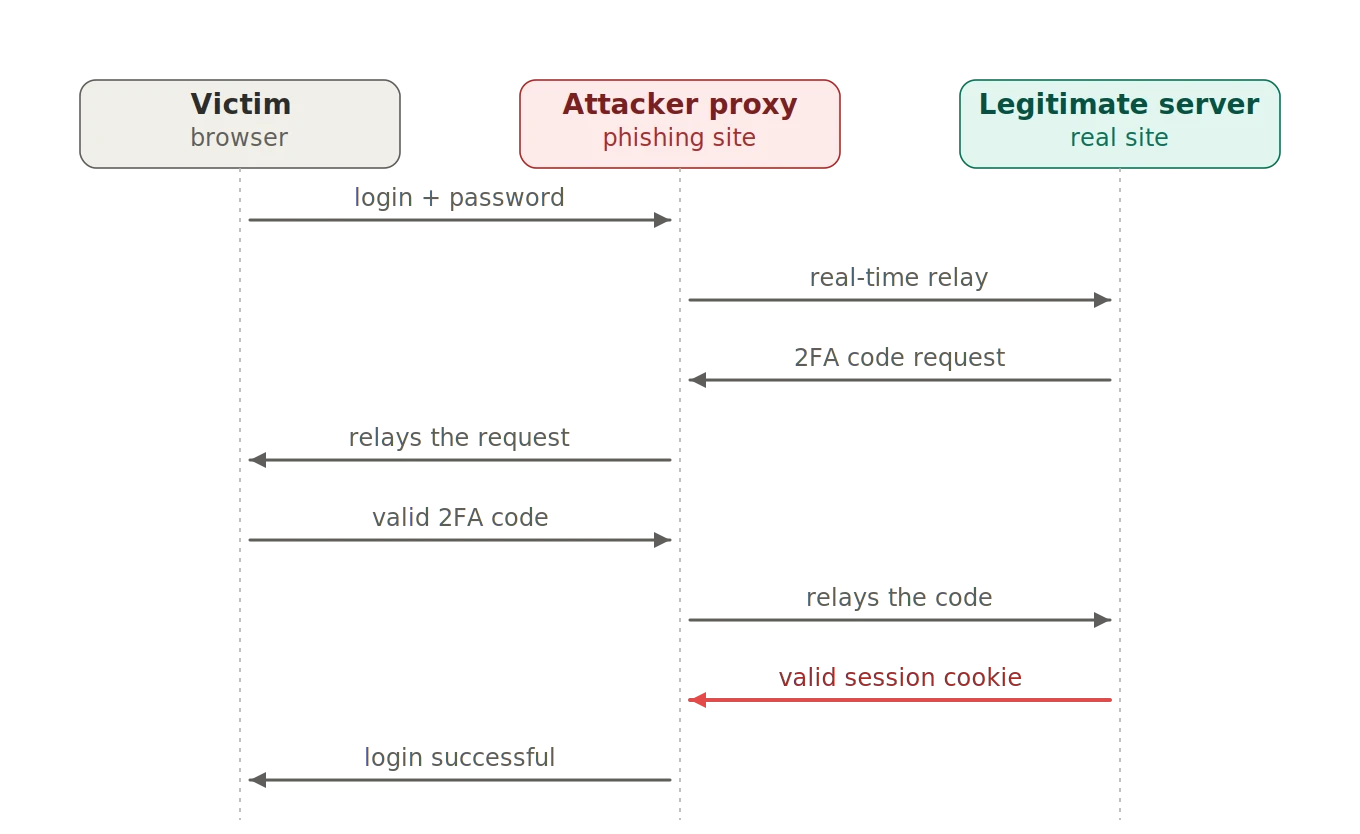
2FA remains effective against offline attacks: a database of stolen passwords becomes useless if 2FA is active. But against a real-time relay, a one-time code is no longer sufficient.
Do passkeys protect against phishing?
Yes. A passkey is cryptographically bound to the exact domain for which it was created. On a fake site - even one that looks visually identical - it simply doesn't activate, because there's no shared secret to enter or intercept.
Authentication relies on a cryptographic exchange between the user's device and the legitimate server: nothing to replay, nothing to steal. Even a real-time AiTM relay cannot bypass this protection. Passkeys represent the structural answer to phishing, by eliminating the weak link that is the secret a user can unknowingly hand over.
Key takeaways
- Phishing relies on the appearance of legitimacy and a sense of urgency: slowing down before you click is the first habit to build.
- The URL is the most reliable indicator: learn to read the real domain name before entering anything.
- If you entered a password on a fake site, change it immediately on the real service - and everywhere you reused it.
- A password manager verifies the URL for you and can't be fooled by a fake domain.
- 2FA protects against offline attacks, but not against real-time phishing.
- Passkeys are the only structural protection that makes phishing technically ineffective.
Beyond individual best practices, the security of your data also depends on the platform you choose. Learn about our approach to security and data sovereignty.